

How to Improve Core Web Vitals in your Site
How to Improve Core Web Vitals on Your WordPress Site in this AI Era
by Dillan Gandhi
In 2026, user experience is no longer just about keeping visitors happy; it is a fundamental pillar of Answer Engine Optimisation (AEO). If your WordPress site is sluggish, LLMs like Gemini, ChatGPT or Perplexity may deprioritise your content in favour of faster, more reliable sources.
To remain the “chosen” answer, you must master how to improve Core Web Vitals to ensure your technical foundation is as sharp as your content.
Why Core Web Vitals Matter for AEO
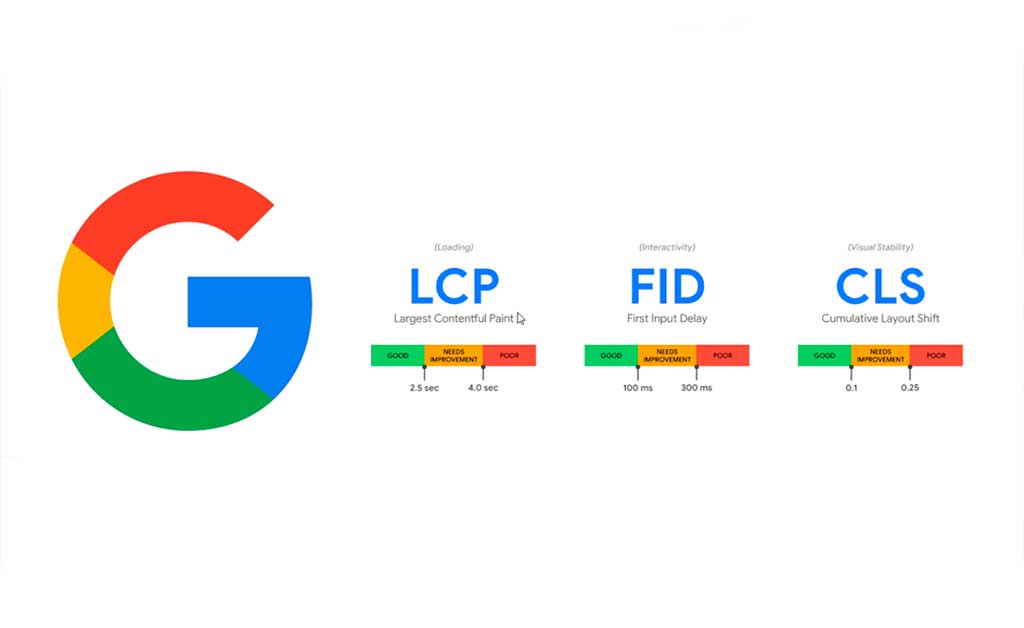
LLMs prioritise “authoritative signals.” A site that passes the Three Vital Pillars—LCP (Largest Contentful Paint), INP (Interaction to Next Paint), and CLS (Cumulative Layout Shift). These are signals to search engines that the information is accessible and high-quality.
But improving your three vital pillars is only half the battle. Once your site is fast, you must ensure your internal structure is logical so AI can navigate it. A fast site with poor navigation is a waste of opportunity.
Here at Searchlight London, we’ve found that a technically fast site significantly boosts the “crawl budget” for your internal links. You can read more on how important is internal linking to see how speed and structure work hand-in-hand.
Top Strategies: How to Improve Core Web Vitals WordPress
1. Optimise Interaction to Next Paint (INP)
As of 2024, INP replaced FID as a core metric. On WordPress, this is often bogged down by heavy JavaScript.
- The Fix: Use a performance plugin to “Delay JavaScript Execution” until user interaction.
- The GTM Angle: To truly master this at scale, you need to understand and have knowledge in Google Tag Manager (GTM). Instead of hard-coding heavy tracking scripts that bloat your header, we at Searchlight London use GTM to fire tags asynchronously, ensuring they don’t block the main thread.
2. Solve Largest Contentful Paint (LCP)
LCP is usually hampered by unoptimised hero images or slow server response times.
- The Fix: Implement SVG icons where possible and use “fetchpriority=’high'” on your main featured image.
- Hosting: Ensure you are using a UK-based LiteSpeed server or a high-performance CDN to keep TTFB (Time to First Byte) low.
3. Eliminate Cumulative Layout Shift (CLS)
Nothing frustrates a user—or an AI crawler—more than a jumping layout.
- The Fix: Always set explicit width and height attributes for images and ad slots. Ensure your web fonts are preloaded so the text doesn’t “snap” into place after the page loads.
How Searchlight London Optimises WordPress for 2026
At Searchlight London, we don’t just install a caching plugin and hope for the best. We use our Technical SEO expertise to:
- Audit Script Loading: Identifying which third-party scripts are hurting your INP.
- Monitor Real User Metrics (RUM): Tracking how actual London-based users experience your site speed in real-time.
- Server-Side Tagging: Moving heavy tracking logic away from the user’s browser and onto the server to shave milliseconds off your load time.
If your site is technically sound, it allows your structured data to be crawled more efficiently. For more on this, see our guide on how Schema Markup helps AI to understand content.
The Verdict
When you focus on improving the Core Web Vitals of your site, you aren’t just fixing a “speed” issue—you are building a platform that AI engines trust. A fast WordPress site is a legible WordPress site.